Exchange Online – Basic Authentication Disabled Oct 1, 2022 – Part Deux

So you have done your due diligence and are sure your in the clear. You would like to manage this change and turn off Basic Authentication and test yourself before and not wait for Microsoft. That is todays #MicrosoftCloudQuickFix !

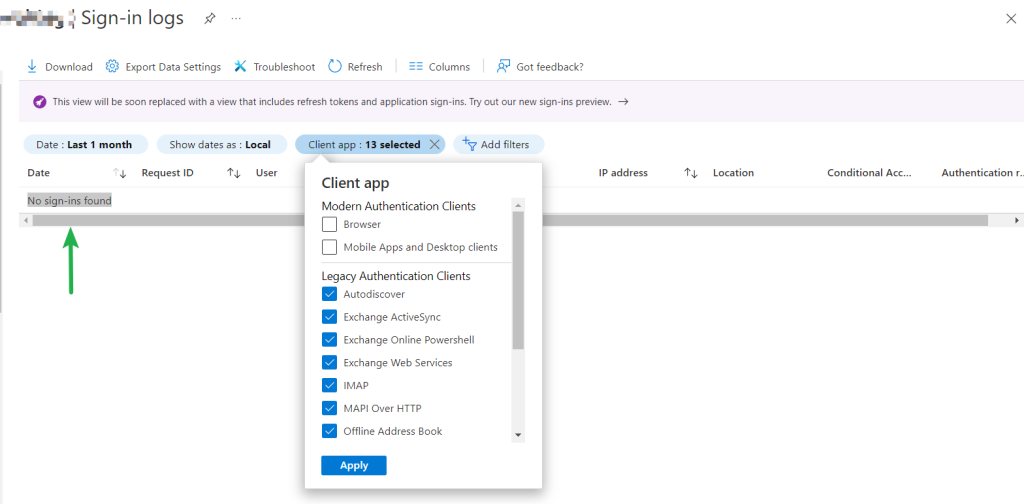
As outlined in my previous blogpost to prepare for the change check the Azure Active Directory Sign-In logs per New tools to block legacy authentication in your organization – Microsoft Tech Community which will help track down any clients still using Basic Authentication.

If you don’t have any Basic Authentication sign-ins then you can move on to block Basic Authentication for protocols on your tenant.
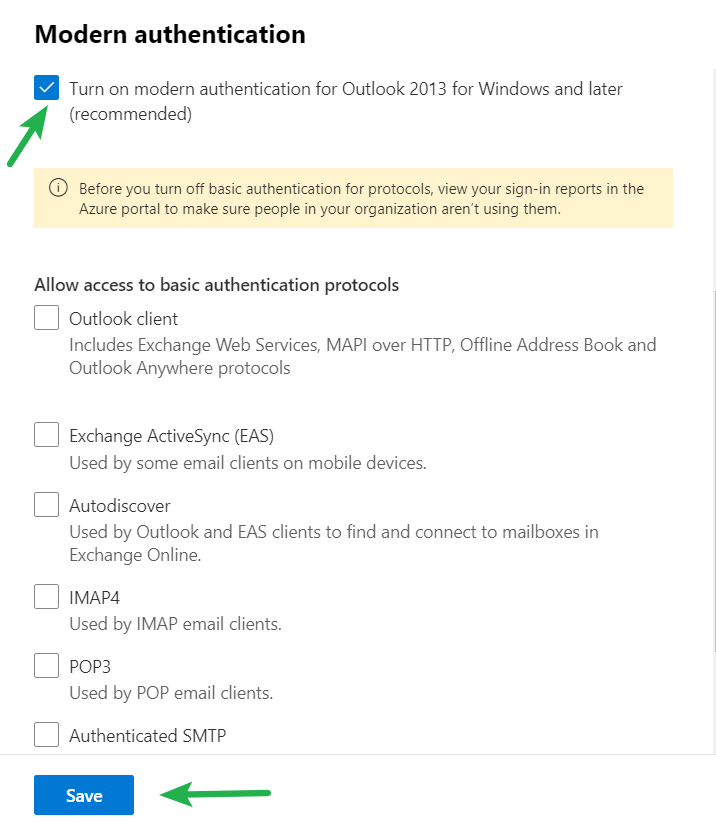
In your Microsoft 365 Admin Portal Next navigate to settings > Org Settings > under Services > Modern Authentication and ensure that “Turn on modern authentication for Outlook 2013 for Windows and later” is enabled and then under “Allow access to basic authentication protocols” uncheck any protocols you wish to no longer use Basic Authentication. Click “Save” and test.
For more information check out the following Disable Basic authentication in Exchange Online | Microsoft Docs in Microsoft Docs.

#Microsoft365 #ExchangeOnline #BasicAuthentication #ModernAuthentication #MicrosoftCloudSecurity #MicrosoftCloudQuickFix

Exchange Online – Basic Authentication Disabled Oct 1, 2022

There are three work weeks left until #Microsoft is scheduled to disable Basic Authentication access to Exchange Online. This is today’s #MicrosoftCloudQuickFix !

Back in September 2019 Microsoft announced they are disabling Basic Authentication access to Exchange Online to be replaced with Modern Authentication methods built on OAuth 2.0 token-based authorization. Modern Authentication has many improvements which mitigate issues with Basic Authentication and provide an improved security posture but as we are all aware there were circumstances in the world that pushed that date forward.

Beginning October 1, 2022 Microsoft will start disabling Basic Authentication for MAPI, RPC, Offline Address Book (OAB), Exchange Web Services (EWS), POP, IMAP, Exchange ActiveSync (EAS), and Remote PowerShell access protocols on randomly selected Exchange Online tenants. You will know ahead of time when your tenant has been chosen by a posted message in your Microsoft365 Admin Center Messages 7 days beforehand and a post to the Service Health Dashboard notifications.

To prepare for this change check the Azure Active Directory Sign-In logs per New tools to block legacy authentication in your organization – Microsoft Tech Community which will help track down any clients still using Basic Authentication and allow you to update your clients as appropriate. After the change to your tenant any client using Basic Authentication for an affected protocol will be unable to connect and will receive an HTTP 401 error: bad username or password error.

If you don’t have any Basic Authentication sign-ins then there is nothing you need to do.

Microsoft does recognize you may not be ready to turn off Basic Authentication and there is a Self-Service Re-Enablement process outlined. Note: that this is a one time re-enablement of Basic Authentication which will last until the end of December 2022 only and during the first few weeks of 2023 any re-enabled protocols will be disabled again permanently.

For more information check out the following Deprecation of Basic authentication in Exchange Online in Microsoft Docs.

#Microsoft365 #ExchangeOnline #BasicAuthentication #ModernAuthentication #MicrosoftCloudSecurity #MicrosoftCloudQuickFix
Aug 26, 2022 – New Podcast Available

In this episode Ryan McKay and Andrew Lowes discuss the retirement of the Classis Exchange Online Admin Center, advise where its features can be now be found in other spots in M365, and share fond memories of the Classic Exchange Online Admin Center!

URLs shown in today’s video podcast include:

Deprecation of the classic Exchange admin center

What’s new in the Exchange admin center in Exchange Online

#Microsoft #Microsoft365 #ExchangeOnline #MicrosoftCloudQuickFix

Reminder – Exchange Server 2013 End of Support April 2023

Today’s #MicrosoftCloudQuickFix is that Exchange Server 2013 is reaching end of support in a little over 7 months from now. After April 11, 2023, #Microsoft will now longer provide technical support for problems that may occur, bug fixes for new issues that are discovered, security fixes for vulnerabilities that are discovered, and time zone updates.

Upgrade to Exchange Server 2019 – See the following page on Microsoft Docs for Exchange Server system requirements and/or

Migrate to Exchange Online – See Decide on a migration path in Exchange Online on Microsoft Docs

In either case I highly recommend using the Exchange Deployment Assistant which is a web-based tool that asks you about your current Exchange environment and generates a custom step-by-step checklist that will help you.

Note: It is a supported coexistence scenario for Exchange 2019 and Exchange 2013 provided all your Exchange 2013 servers in your organization are patched to Exchange Server Cumulative Update 21 (CU21 – released June 2018) or higher. See Exchange Server build numbers and release dates

#Microsoft #Microsoft365 #ExchangeOnline #MicrosoftExchange #MicrosoftCloudQuickFix

Aug 5, 2022 – New Podcast Available

In this episode Ryan McKay and Andrew Lowes of @AzureTracks talk about the retiring of the “Exchange Online PowerShell module with MFA” and what how that changes how as admins you will securely connect to and manage Exchange Online via PowerShell and the new Exchange Online PowerShell V2 module.

URLs shown in today’s video podcast include:

https://docs.microsoft.com/en-us/powershell/exchange/exchange-online-powershell-v2?view=exchange-ps

https://docs.microsoft.com/en-us/powershell/exchange/exchange-online-powershell-v2?view=exchange-ps#install-and-maintain-the-exo-v2-module

https://youtu.be/71ZKUvyr-bI

Microsoft #Microsoft365 #ExchangeOnline #MicrosoftCloudSecurity #AzureTracks #MicrosoftCloudQuickFix

Native External Sender Alerts on emails in Outlook

#Microsoft has released native External Sender Alerts on emails in Outlook for #ExchangeOnline email. This is today’s #MicrosoftCloudQuickFix !

It is hard to find that balance between user experience and cybersecurity and in today’s #HybridWorkplace it is as important as ever.

In the past to draw the attention of users to email which has come from external sources Exchange Administrators have leveraged Mail Flow rules (formerly Transport rules) to prepend to the subject line or insert to the message body to show the email is from external senders.

This approach has its limitations and can make reading the preview of email on mobile devices troublesome.

With Native External Sender Alerts on emails in Outlook for #ExchangeOnline email a new user experience is enabled. Note: Only Outlook products are supported on Windows, Mac, iOS, Android and Outlook on the web.

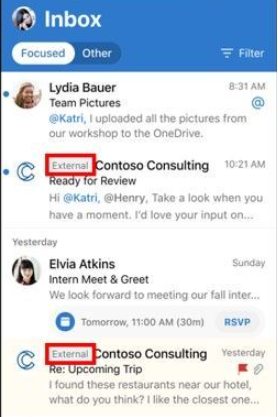
Outlook on the web, Mac, and mobile will display an External tag in the message list. Outlook Desktop and OWA will show the sender’s email address at reading pane info bar.

Outlook on the web view of External sender:

In Outlook for iOS:

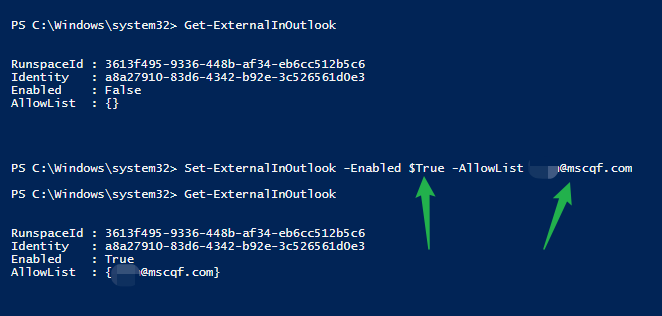
The feature is enabled thru PowerShell and may take 24-48 hours to become active. Don’t forget to disabled the old Mail Flow rule!

Check out this Microsoft Docs page for more details on Set-ExternalInOutlook PowerShell cmdlet to enable External Sender Alerts on emails in Outlook in for Exchange Online email!

#MicrosoftCloudQuickFix #Microsoft365 #ExchangeOnline

Update to Exchange Online Reply-All Storm Protection

Your #MicrosoftCloudQuickFix is that #Microsoft has announced some important updates to the #ExchangeOnline Reply-All Storm Protection settings to roll-out by mid June 2021.

Reply-all Storm Protection helps protect your organization from unwanted reply-all storms which could disrupt your email services and in some cases throttle the rest of your organization’s email!

#Microsoft has announced the ability to customize these setting specifically to your organizations needs inside your #Microsoft365 Tenant. Administrators will have the flexibility to enable/disable the feature, and set customized detection thresholds and block duration time allowing smaller organizations to take advantage of Reply-all Storm Protection.

Check out the Exchange Team Blog for more details!