Today’s #MicrosoftCloudQuickFix is #MSIgnite may have wrapping up, but all the announcements can be found in one place in the 𝗠𝗶𝗰𝗿𝗼𝘀𝗼𝗳𝘁 𝗜𝗴𝗻𝗶𝘁𝗲 𝗕𝗼𝗼𝗸 𝗼𝗳 𝗡𝗲𝘄𝘀 2025 found here:
Today’s #MicrosoftCloudQuickFix is that registration is still open for tomorrow’s #Microsoft premium immersion event called Microsoft Ignite!
Microsoft Ignite is an annual conference organized by Microsoft for IT Professionals and Developers to learn about the latest Microsoft technologies and solutions.
The event offers attendees the opportunity to engage in networking, attend keynote presentations, participate in breakout sessions, and explore the latest innovations and technologies showcased by Microsoft.
At Microsoft Ignite, attendees can gain valuable knowledge about Microsoft’s latest products, services, and solutions. I would suspect this years will be heavily focused on the various new Copilot offerings.
Though IT Professional / Developer centric Microsoft Ignite can be a valuable source of information for customers and I would highly recommend they attend to gain visibility into Microsoft’s vision and product roadmap!
Managing remote Exchange Online hosted mailboxes post migration has been a pain for some time. Some attributes are managed in the cloud, others on premises, and to do it right you needed to keep an Exchange Server around… Well Microsoft has a new feature which allows admins to manage the Exchange properties of directory-synchronized users with remote mailboxes directly from the cloud and THIS jaw dropper is today’s #MicrosoftCloudQuickFix !!!
A new capability in preview for Exchange Online allows administrators to manage Exchange attributes for directory-synchronized users with mailboxes hosted in Exchange Online. With the update, the Source of Authority (SOA) for Exchange-specific attributes can be transferred to the cloud, while the SOA for identity-related attributes remains under the control of Windows Active Directory.
After moving the SOA for Exchange-specific attributes to Exchange Online / Entra ID, these attributes can be managed using EXO PowerShell, the Microsoft 365 Admin Centre, or the Exchange Admin Centre with future support for write-back support of designated attributes via Entra Cloud Sync.
Microsoft is providing this feature in two phases:
Phase 1 (Preview): allows admins to enable cloud management of Exchange attributes per mailbox by setting IsExchangeCloudManaged to true. Mailboxes can be reverted to on-premises management by resetting IsExchangeCloudManaged to false.
Phase 2: will include write-back support for specified attributes and Entra Cloud Sync integration. During this phase, updates to key Exchange properties made in Entra ID will be automatically synchronized with the on-premises Windows Active Directory. This process keeps the on-premises AD current; for example, changes to a proxy address in Exchange Online will be updated in Active Directory. To access write-back functionality, customers must implement Entra Cloud Sync.
The new cloud-managed mailbox capability allows organizations that use on-premises Windows Active Directory for identity to manage their Exchange Online mailbox attributes in the cloud. As a result, it is no longer necessary to maintain an Exchange server or management tools on-premises for routine Exchange administration tasks!
Microsoft Teams users will soon have enhanced Private Channel and Compliance capabilities. Responding to feedback #Microsoft has announced that they are making change to Microsoft Teams Private Channels which will increase their scalability, flexibility, and streamline compliance management. That is today’s #MicrosoftCloudQuickFix !
Private channels in Microsoft Teams provide a controlled space for structured, sensitive discussions. The changes will be accomplished by transitioning the Private Channel backend storage mailbox to a group mailbox instead of a using individual mailboxes of private channel members to store messages.
After the updates to private channels in your tenant private channels will be capable of:
Feature
Current
New
Max private channels per team
30
1000
Max members per private channel
250
5000
Meeting scheduling
❌
✅ Supported
Simplified Compliance
At a user level
Group
Aligning private channels with group mailbox storage allows compliance policies, like retention, legal hold, DLP, and/or eDiscovery, to be set at the Team (M365 Group) level. This reduces complexity since a single policy can cover both standard and private channels within a Team.
These enhancements are in General Availability and will begin rolling out in late-September 2025 with a completion by mid-December 205 Worldwide!
During this timeframe, private channel data will gradually migrate from user mailboxes to the Team’s group mailbox. Private channels can be used throughout the migration normally. Microsoft will be providing a new PowerShell command to track progress and check whether the migration has started or is completed in your Tenant.
Working your way thru an Exchange SE Migration and need a bit more time? This week marks t-minus 2 months until the end-of-support for Microsoft Exchange Server 2016 / 2019. After October 14, 2025, Microsoft will no longer provide technical support, bug fixes, or security update unless… You request to join the Exchange 2016 / 2019 Extended Security Update program. This is today’s #MicrosoftCloudQuickFix !
Exchange Server SE is the next release of Microsoft Exchange Server and is now available download. The licensing model for Exchange Server SR requires subscription licenses for all users and devices that access Exchange Server SE on top of required Server licenses and CALs. Microsoft will continue to provide a free Hybrid server license and key via the Hybrid Configuration Wizard.
Now of course on October 15, 2025 your Exchange 2016 and Exchange 2019 servers will continue to work but it is recommended you begin to prepare now if you will require more time to perform your upgrade or migrations.
Beginning on August 1, 2025, customers with an Microsoft Agreement can contact their Microsoft account rep to inquire and purchase a 6 month Extended Security Update (ESU) for their Exchange 2016 / 2019 servers. Your Microsoft account rep will have information related to per server cost and additional details on how to purchase and receive ESU updates.
Notes about the Expended Security Updates:
ESU’s are priced per Exchange Server
Exchange 2016 and Exchange 2019 will still go end-of-support on October 14, 2025, and you will not be able to open support cases for them
This ESU is a way for customers who might not be able to finalize their migrations to Exchange SE before October 14, 2025, to receive Critical and Important updates
Microsoft isn’t committing to actually releasing any SUs during the ESU period. Microsoft will confirm with ESU participants each Patch Tuesday whether an Exchange SU will be provided or not
ESU’s will be valid for 6 months only to April 14, 2026). There will be no extension of ESU’s past April 2026.
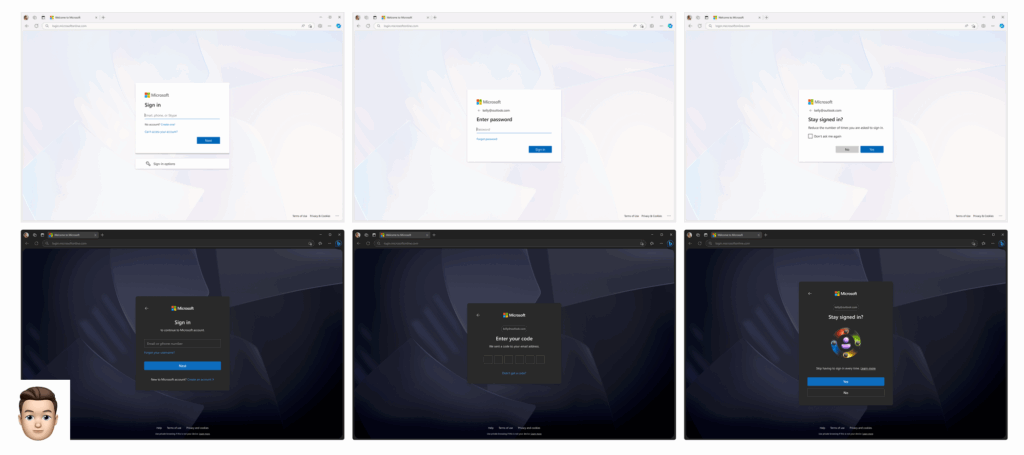
Microsoft is releasing a new default background image for the Microsoft Entra Personal and Work/School sign-in experience. This is today’s #MicrosoftCloudQuickFix !
Microsoft is making a change to the sign-in experience to align with the new modern design principals with the modernized end-user UX which aims to provide a cleaner experience across all authentication flow.
This update is visual only, no user or admin action is required, and it will not affect sign-in functionality nor will it supersede any corporate company branding configured in a Work or School Microsoft Entra ID tenant. This update will only affect screens where Company Branding doesn’t apply.
This update is already in General Availability and rolling out worldwide in August 2025 for personal Microsoft accounts, in late September 2025 for Microsoft Work and School accounts, with an expected completion by mid-October 2025.
Although no administrator action is needed to prepare for this change it is recommended to notify users of the change and update training documentation.
Do you have old on-premises Exchange servers kicking around? Old Hybrid Exchange servers left over from a previous Exchange Online Migration or an anonymous SMTP relay? Last week marked t-minus 6 months until the end of support for Microsoft Exchange Server 2016 / 2019. After October 14, 2025, Microsoft will no longer provide technical support, bug fixes, or security updates. What are your options? This is today’s #MicrosoftCloudQuickFix !
Of course, on October 15, 2025, your Exchange 2016 and Exchange 2019 will continue to work but it is recommended you begin to prepare now.
We recommended that you either fully migrate to Exchange Online as moving to Microsoft Cloud Services ensures continuous support, access to advanced features, and security advancements or (and if you haven’t done this by now there is likely good reason) upgrade your on-premises Exchange Servers to Exchange Server Subscription Edition (SE) to be released in July 2025 and offers a direct in-place upgrade from Exchange Server 2019 CU 15 released in February 2025.
If you are still running Exchange Server 2016 you should perform a side-by-side ‘legacy upgrade’ to Exchange Server 2019 CU 15 now and then perform the in-place upgrade to Exchange Server SE once released. The good news is Exchange Server 2019 CU15 is fully supported on Windows Server 2025!
Exchange Server SE is the next release of Microsoft Exchange Server and will be available for download in July 2025. The licensing model for Exchange Server SR requires subscription licenses for all users and devices that access Exchange Server SE on top of required Server licenses and CALs. Microsoft will continue to provide a free Hybrid server license and key via the Hybrid Configuration Wizard.
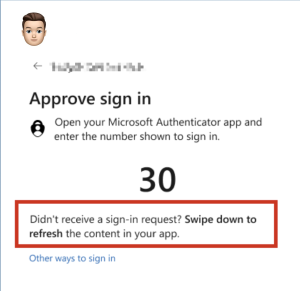
Ever had connectivity issues that delayed your MFA authentication? Left your phone by the coffee pot but have your cup ready for the meeting? One-time code expired before you could use it? Microsoft is changing the user sign-in experience to help reduce duplicate request errors and allow the user to refresh their notifications in the Microsoft Authenticator app. This is today’s #MicrosoftCloudQuickFix !
With the rollout of this change the user sign-in experience will include the message, “Didn’t receive a sign-in request? Swipe down to refresh the content in your app.” advising the user that they can refresh notifications in the Microsoft Authenticator app (or Microsoft Authenticator Lite for Outlook mobile) if they have not received the sign-in notification. Once refreshed the user can complete the sign-in.
This is already in General Availability and began rollout worldwide in late March 2025 with an expected completion by mid-April 2025.
Although no administrator action is needed to prepare for this change it is recommended to notify users of the change and update training documentation.
Microsoft has announced that it will block access to versions of the Microsoft Teams desktop client older the 90 days. Enforcement of this policy has been deferred several times but it is now proceeding and that is today’s #MicrosoftCloudQuickFix !
Keeping Microsoft Teams up to date is critical to ensure devices remain secure and compliant. By default, Teams updates automatically which successfully updates most clients around the world without user interaction.
With this announcement Microsoft Teams desktop clients older than 90 days will be blocked. Users with these versions will see a blocking page and won’t be able to use the app.
The blocking page will be displayed:
Starting April 11th, 2025, for users using the Windows desktop app
Starting May 6th, 2025, for users using the Teams app in VDI environment
Starting May 15th, 2025, for users using the Mac desktop app
An in-app warning banner will appear 60 days beforehand (30 days before for VDI versions) to remind users they need to update.
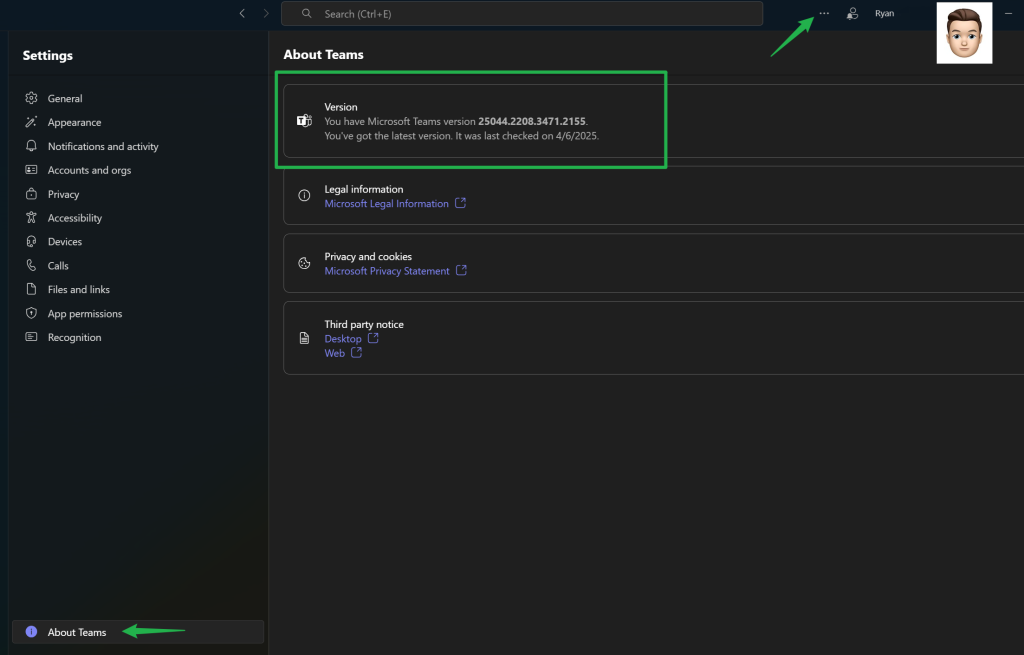
To prepare for this change make sure you’ve updated to the latest version of Microsoft Teams either by going to the download page (listed below) or inside the Teams client under the ellipsis menu ( … ) -> Settings -> About Teams.
Administrators should make sure their users Teams application is automatically updating to stay current.
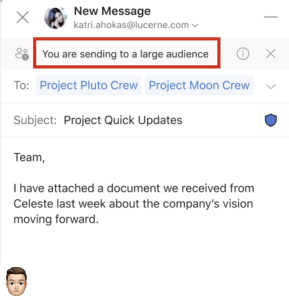
Sending an email to a large audience can be a challenge. We have all seen mistakes made in content, wording, tone, or worse when the sender is clearly on-the-go and sent the email without considering audience. Soon the Microsoft Outlook App will warn you when sending to more than 25 recipients. That is today’s #MicrosoftCloudQuickFix !
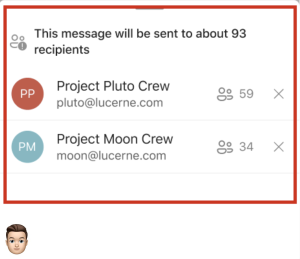
Users will soon receive a warning message in the MailTips info bar above the address line in the Microsoft Outlook app if they are about to email a large number of recipients. The default large audience value is set to 25 recipients and can be adjusted by an administrator. Further details are provided when the warning is selected and adjustments can then be made to the recipient list.
It is recommended to notify users of this change and update training documentation. Although no administrator action is needed, you may wish to adjust the default large audience size warning value of 25 recipients to align with your company’s specific requirements.