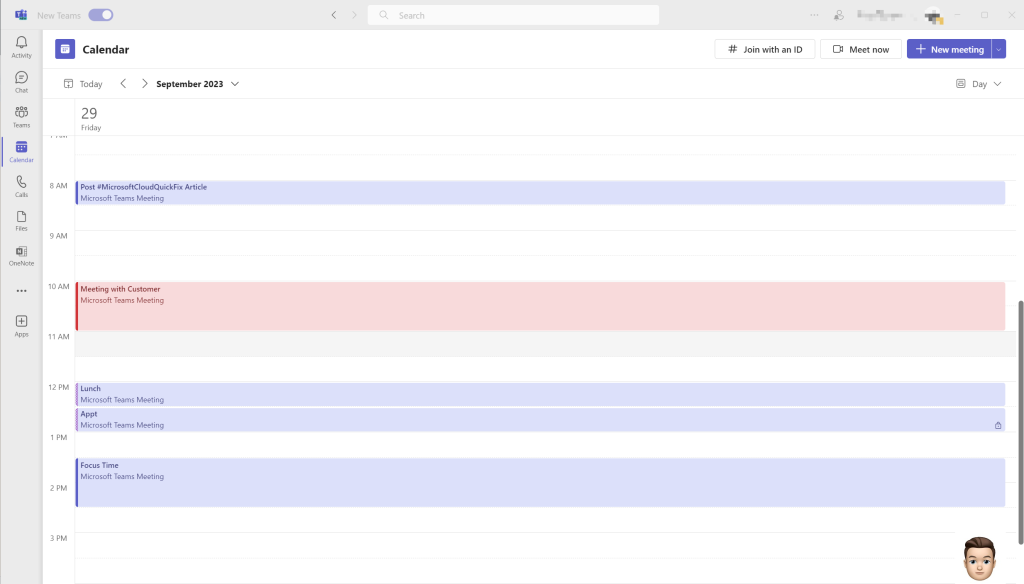
Your Microsoft Teams users will soon have a more reliable calendaring experience. That is today’s #MicrosoftCloudQuickFix !
This update is intended to streamline calendar management helping users keep track of their schedules consistently across Outlook and Teams.
Screenshot02
Contained within Microsoft 365 Roadmap ID 138248 is an update where #Microsoft will enable calendar updates made in Outlook to be available in near-real time in your #MicrosoftTeams calendar in the Desktop and Web versions of Teams and vice-versa.
This feature has begun rolling out in September 2023 with a completion by mid-October and will be available Worldwide!
Today’s #MicrosoftQuickFix is that #Microsoft will soon begin sending DMARC Aggregate Reports as part of the #DMARC standard and as the owner of a domain you can request reports be sent to wherever your DMARC DNS record RUA setting points to. Is it time to revisit your #Microsoft365 domains DMARC, DKIM and SPF security settings?
Phishing attacks are getting more sophisticated and most organizations have implemented email security measures like SPF (Sender Policy Framework) and DKIM (DomainKeys Identified Mail) to help mitigate these risks.
Unfortunately SPF and DKIM alone do not provide 100% protection against email attacks or nefarious hackers spoofing a companies domain regardless of SPF and DKIM implementation.
DMARC (Domain-based Message Authentication, Reporting) works with SPF and DKIM to authenticate your mail senders. With a DMARC record configured you’ll get reports that provide the status of your email authentication so you can improve it if needed. This helps you detect malicious emails that claim to be from your domain.
Note: DMARC reports are in XML format and contain a lot of technical data. There are several DMARC report analyzer tools available as well as third-party vendors offering DMARC reporting capabilities.
Using DMARC with SPF and DKIM gives organizations more protection against spoofing and phishing of email. DMARC also helps receiving mail systems decide what to do with messages from your domain that fail SPF or DKIM checks thru the actionable DMARC policy you specify.
DMARC Aggregate Reports will be available for all Exchange Online Protection customers beginning in late February 2023 with expected rollout to complete in late March 2023.
For more information about DMARC in Microsoft 365 see:
Have you every accidently sent an email that wasn’t ready? Sent it to the wrong person? Something you regret? Rage quit? 🤨 Any combination of the above but to a Distribution List? Or are you an Exchange Admin watching this unfold knowing what comes next… Well Microsoft is FINALLY fixing the Message Recall feature and that is today’s #MicrosoftCloudQuickFix !
For several years #Microsoft has been working on a new cloud-based Message Recall feature for Exchange Online. This week it was announced that it is finally ready and has begun rolling out to all #Microsoft365 tenants – Still need a business case for migration to #ExchangeOnline ?
The classic #MessageRecall feature was hit-and-miss at best. It was client-based requiring the recipient to have Outlook for Windows open, clunky, didn’t work if the message had been read or moved, filled the requestors mailbox with recall status email notifications, and had a success rate of about 50%.
The new Message Recall feature has a greater then 90% success rate, occurs within the Exchange Online mailbox and is no longer client based, is fast regardless of how many recipients got the message due to scale of cloud resources in Exchange Online, provides a new single status report per recalled message, and can even recall read or moved messages!
After a Message Recall request is executed the next time the recipient’s email client syncs, regardless of client now, with their Exchange Online mailbox the message should be gone. Now you can breath again…
See a feature comparison below:
Capability
Classic Message Recall
New Message Recall
Average recall success rate
40%
> 90%
Recalls are performed in the cloud
No
Yes
Recipients can use any email client to be eligible for recalls
No
Yes
Can recall read messages
No
Yes
Can recall messages from sub-folders (except Draft and Sent Items by design)
No
Yes
Single recall status report for all recipients
No
Yes
Note: Message Recall has always only been available if both you and the recipient are in the same email organization. You can not recall messages sent outside to other companies, even if they use Microsoft products, or to Gmail, Hotmail, etc.
For more information about Message Recall or how to perform one see:
Yesterday was Groundhog Day and in honor of the great movie with the same name today’s #MicrosoftQuickFix is once again (get the reference now 😉) that Exchange Server 2013 is reaching end of support in 67 days from today on April 11, 2023!
After April 11, 2023, #Microsoft will no longer provide technical support for problems that may occur, bug fixes for newly discovered issues, security fixes for vulnerabilities that are discovered, and time zone updates.
Now look this doesn’t mean that because the Exchange Server software is out-of-date and no longer supported that it is going to stop working. Email will still flow, databases will still store data, mailboxes will still be accessible, but nefarious hackers will breathe a sigh of relief as the code now remains stagnant and despite “network magic” mitigation attempts all it takes is one zero-day venerability making its way in…
Note: It is a supported coexistence scenario for Exchange 2019 and Exchange 2013 provided all your Exchange 2013 servers in your organization are patched to Exchange Server Cumulative Update 21 or higher.
In either case we recommend seeking assistance and using the Exchange Deployment Assistant which is a web-based tool that asks you about your current Exchange environment and generates a custom step-by-step checklist that will help you.
I’m back from winter break and today’s #MicrosoftCloudQuickFix is #Microsoft365 finally supports concurrent Exchange Online License Assignments!!! This is going to dramatically reduce the administrative burden managing #ExchangeOnline license assignments and specifically will allow an intuitive groups-based licensing strategy!
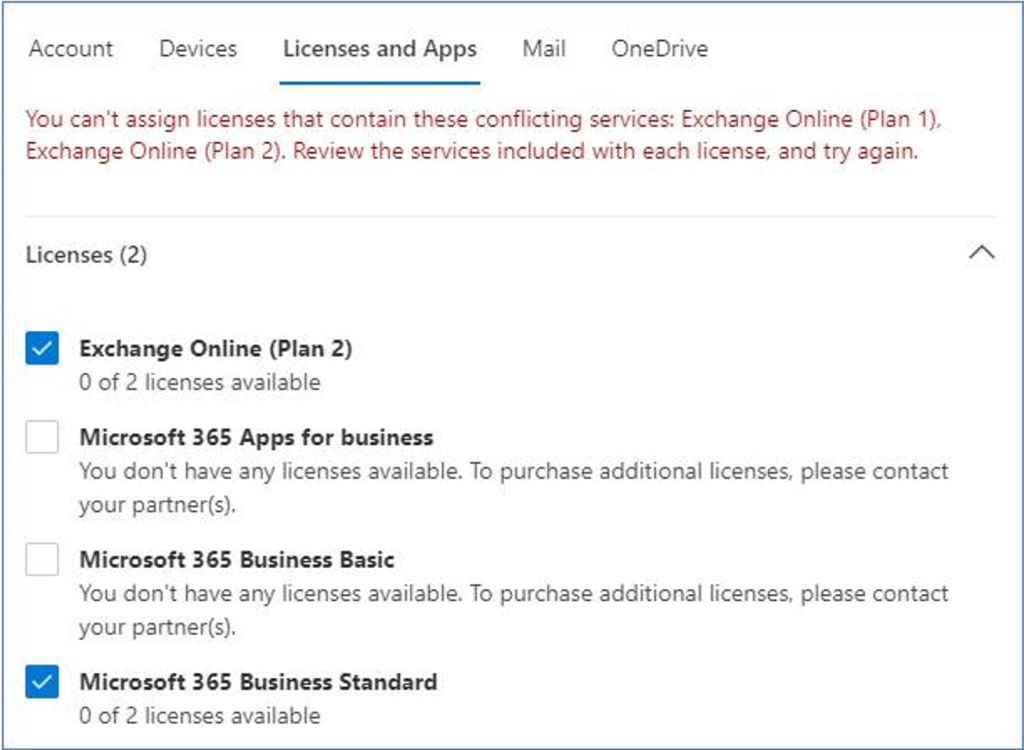
Previously when Microsoft 365 Tenant Admins tried to assign more then one license pack containing #ExchangeOnline to the same user, whether that be thru the Microsoft 365 Admin Center, #AzureActiveDirectory PowerShell, or group-based licensing, an exception message would be displayed and the assignment rejected.
In this case the user already has an Exchange Online Plan 1 license included in Microsoft 365 Business Standard suite and the Tenant Admin is looking to upgrade the user to an Exchange Online Plan 2 license likely to take advantage of the larger mailbox size, Data Loss Prevention, In-place Hold, or Exchange Online Archiving capabilities.
The same exception message is displayed for any combination of the following licenses:
Microsoft 365 Business packages: Basic, Standard, Premium
Other #MicrosoftTeams and #MicrosoftProject license packs which rely on Exchange Online
Now with this change any combination of the above is allowed and Exchange Online will automatically decide which of the assigned plans is “superior” and will enable the features of that plan (mailbox quotas, transport limits, protocol access, etc.).
When a license is removed Exchange Online will reevaluate and adjust as needed to the new superior plan.
Today’s #MicrosoftCloudQuickFix is that #Microsoft has released the November 2022 Exchange Server Security Updates which contain fixes for the CVE-2022-41040 and CVE-2022-41082 vulnerabilities reported at the end of September 2022 and reported discussed on my blog post below:
CVE-2022-41040 is a Server-Side Request Forgery (SSRF) vulnerability and can only be exploited by authenticated attackers while CVE-2022-41082 allows remote code execution (RCE) when PowerShell is accessible to the attacker.
The November 2022 Exchange Server Security Updates are available for Exchange Server 2013 CU23 (Note: Support ends in April 2023), Exchange Server 2016 CU22 and CU23, and Exchange Server 2019 CU11 and CU12. Since #Microsoft has been made aware of active exploits of related vulnerabilities their (and my) recommendation is to install these updates immediately!
Microsoft has indicated that #ExchangeOnline customers are already protected from the vulnerabilities addressed in the November 2022 Exchange Server Security Updates and do not need to take any action other than updating any remaining on-premises Exchange servers.
For more information about this and Exchange Server Patching see:
Upgrades to how your email signatures are stored will be launching soon. That is today’s #MicrosoftCloudQuickFix !
Email signatures regardless of your mailbox residing on-premises or in Exchange Online have traditionally been stored on your local computer. Users have had to recreate them every time they reinstall Outlook, move to a new device, or leverage multiple devices.
As outline in Microsoft 365 Roadmap ID 60371 with this change for mailboxes hosted in Exchange Online, #Microsoft will migrate the local signatures to the cloud automatically, no manual steps are required. This means the same set of signatures will be available on any Windows (Microsoft 365) or Web version of Outlook, and you will no longer need to reconfigure your signatures when getting a new device.
Per Microsoft if you use 3rd party solutions in your environment for signature management this change will not impact you at this time.
Get ready to patch your on-premises versions of Exchange Server ASAP! This is today’s #MicrosoftCloudQuickFix !
Yet again as announced by #Microsoft on Friday September 30, 2022 there are two new reported zero-day vulnerabilities in Microsoft Exchange Server 2013, 2016, and 2019 that are being exploited…
CVE-2022-41040 is a Server-Side Request Forgery (SSRF) vulnerability and can only be exploited by authenticated attackers while CVE-2022-41082 allows remote code execution (RCE) when PowerShell is accessible to the attacker.
Microsoft has said it’s “working on an accelerated timeline” to provide a patch for the two newly disclosed vulnerabilities and while mitigations exist I would recommend a rapid patch deployment once one is available and of course always keeping your Exchange Servers up-to-date with the latest Cumulative Update (CU) and Security Updates (SU).
Microsoft indicated that #ExchangeOnline customers don’t need to take any action at the moment because the company has detections and mitigation in place and of course will apply the patch seamlessly once available – Anyone still need a business case for migration to #ExchangeOnline ?
For more information about this and Exchange Server Patching see:
Microsoft has released Exchange Online PowerShell V3 module. This is today’s #MicrosoftCloudQuickFix !
It is recommended to now use the Exchange Online PowerShell V3 module. Exchange Online cmdlets backed by the REST API are available in Exchange Online PowerShell V3. REST API cmdlets have the following advantages:
More secure: REST API cmdlets have built-in support for modern authentication and don’t rely on the remote PowerShell session, so PowerShell on your client computer doesn’t need Basic authentication in WinRM for Exchange Online PowerShell.
More reliable: REST API cmdlets handle transient failures with built-in retries, so failures or delays are minimized. For example:
Failures due to network delays.
Delays due to large queries that take a long time to complete.
Better performance: The connection avoids setting up a PowerShell runspace in Exchange Online PowerShell.